
Job Grades reflect the hierarchical levels within your organisation. You will upload assigned Job Grades within your employee data, and we’ll do all the work to ensure meaningful reporting in your results. In Workplace Insights (Pro), you'll be able to see how engagement varies across Job Grades for the organisation as a whole, and by employment group, from divisional and departmental level through to individual teams (subject to minimum response thresholds).
If you have opted for basic data only in Workplace Insights, you’ll be able to view some results split by our standard Job Grades. Our standard Job Grades are Director, Senior Manager, Manager, Team Leader / Supervisor and Team Member.
Your language may differ, for instance some common examples might be:
-
Board/Executive
-
Director
-
Head of Department
-
Manager without reports
-
Manager with reports
-
Supervisor
-
Team Member
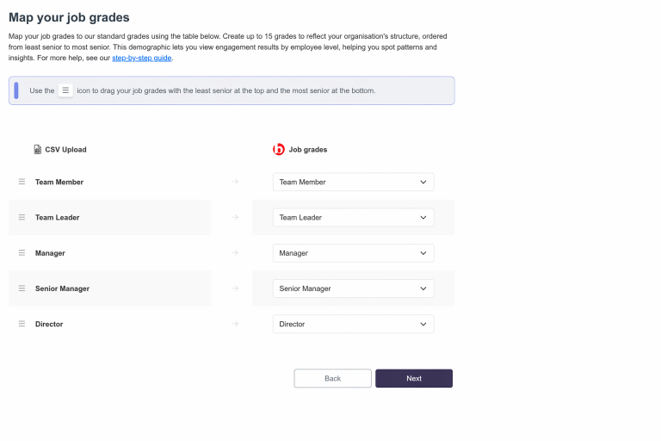
To provide benchmarkable data, you'll map each of your internal Job Grades to our standard Job Grades within the dashboard. This ensures your results are compared against employees at similar levels of seniority and responsibility in other organisations. For example, comparing a Director's results with those of Team Members would not provide a fair benchmark, as their roles, responsibilities and experiences are very different.
Example below:
Job Grades should reflect hierarchy and level of responsibility only. They should not be based on an employee's day-to-day role, as this is already captured through Employment Groups and custom demographics such as Job Roles. Similarly, Job Grades should not be based on pay bands, as higher pay does not always indicate greater responsibility. In some cases, differences in pay may simply reflect length of service rather than seniority.
⚠️Tip: Avoid using abbreviations or internal acronyms for Job Grades. The names should be clear and recognisable to everyone who may view or discuss the survey results.
To protect anonymity, we cannot report results for groups with fewer than five responses. Please keep this in mind when selecting Job Grades. Any grouping should reflect actual job grades and not be used to get around the five-response minimum. For example, if there are only three Directors, they should not be grouped with Managers solely to make the data reportable.
You can find out more about how we protect employee anonymity in this article.
If you have enough employees to do so, we recommend separating managers with direct reports (people managers) from those without. Their experiences can be quite different, and this split can help uncover valuable insights. An example of the benefits of using more detailed Job Grades is shown below.
28 managers all in one standard manager job grade:
.jpg?width=670&height=258&name=rtaImage%20(2).jpg)
Those 28 managers split into two customised job grades:
.jpg?width=670&height=313&name=rtaImage%20(3).jpg)
The split now shows that Managers without direct reports are scoring significantly higher than those with direct reports, helping to identify where action may be needed.
⚠️Caution: Aim to be as detailed as possible with your Job Grades, but be mindful that splitting employees into too many groups can result in some grades having too few responses to be reported. This can limit the insights available when analysing results by employment group.
For additional support please email support@b.co.uk, call us on 01978 856222, or click the 'Get in Touch' button at the top of this page.