
We created the BC8 survey to support our clients who don't want to set up a full survey (whether that be because they only want to survey a subset of their population or to facilitate a way to check in with their staff ahead of a full survey). This serves as a way for your employees to have their say and for you to still get insights into each of the 8 factors that we measure against our full survey.
In our BC8 survey we ask 8 core statements, one for each factor so that we can provide you with a predictive BCI score or "pBCI". Within this you can also opt to include additional statements or open ended comments questions to capture further feedback without creating a full survey for your employees. This is great for anyone looking to survey multiple times a year so you can get an idea upon the engagement of your company in comparison to previous surveys, or for you to survey a subset of your employees, you can read more about pBCI here.
BC8 surveys are not eligible for accreditation.
In order to set up a BC8 survey, you need to be a subscriber of our Improve package. This is so we can create intelligent insight from the data captured by the BC8 survey. This way, data packs can still be generated and meaningful results can be produced to provide you with a PBCI score to get you on the right track for your next full survey.
By default we include 8 statements in the BC8 survey, these can be found below.
BC8 Survey Statements
| My Team | People in our team don’t care much for each other |
| My Manager | My manager cares about how satisfied I am in my job |
| Personal growth | This job is good for my own personal growth |
| Wellbeing | I am under too much pressure at work to perform well |
| Leadership | I am inspired by the person leading this organisation |
| Giving Something Back | I think this organisation should put more back into the local community |
| Fair Deal | I am paid fairly for the work I do relative to people in similar positions in similar organisations |
| My Company | I would leave tomorrow if I had another job |
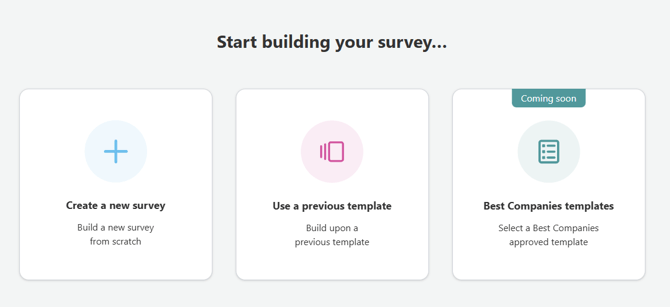
To setup your BC8 Survey, simply select the template from your "Select your survey questions" task within your survey dashboard, select "Create a new survey"
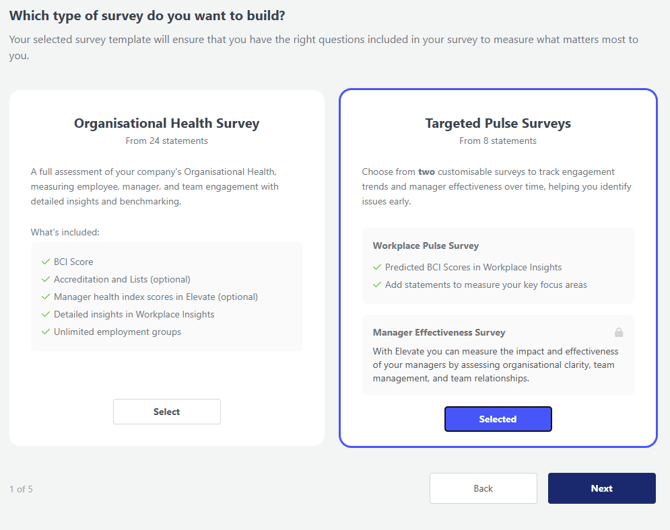
Once you have selected to create a new survey, next select the "Targeted Pulse Surveys" template, from here this can be customised to meet the needs of your survey population.
Once you have completed your BC8 survey, you can view your results and data packs through our Workplace Insight Tool (WIT). If you need anymore information on this survey type, or would like to see some example data of the types of insights that be obtained from this, please reach out to our team by emailing support@b.co.uk.