
What are data packs?
Data packs are handy, ready-to-download information packs containing some of the most significant details from your survey results, including actionable reports based on either your organisation as a whole or your individual employment groups.
How do I access data packs?
If you have Workplace Insight Pro you will be able to access data packs by logging into WIT and clicking on the 'Data Packs & Action Planning’ tile from the homepage. If you have Workplace Insight Basic, this tile will be greyed out. If you’re not sure which package you have, or if you’d like to discuss upgrading, please get in touch.
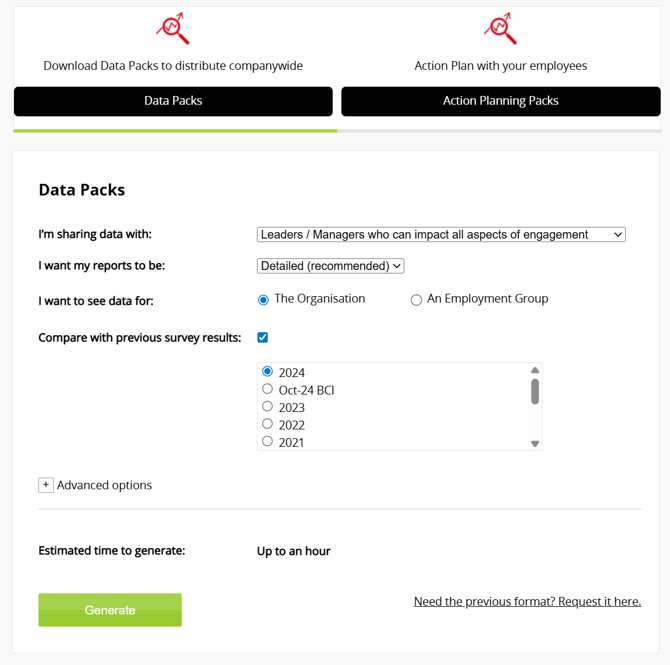
When you click on ‘Data Packs & Action Planning’ you will be directed to the ‘Data Packs’ tab:
Built for the Right Audience
There are two report types available depending on who you’re sharing results with. Within the 'I'm sharing data with' dropdown you can select whether your data pack is intended for Leaders/ Managers or Team Members. This dictates whether the pack generated is a Leader Pack or Team pack and also, which factors are included as a result of them being within their sphere of influence.
Leader Pack
The Leader Pack gives senior managers in your organisation a high-level summary of your results, referencing all 8 factors of Engagement and is available in two formats:
- Detailed (recommended) - comprehensive insights and supporting analysis.
- Concise - a shorter version for quick, focused conversations.
Team Pack
The Team Pack offers a concise overview of the areas team members can more directly impact, excluding Fair Deal, My Manager and Leadership.
Please note: Variations across these packs can result in differences in the data presented. For example, by default the detailed People Leader Packs contain and reference job grade data in logic whereas this information is not part of the analysis on which Team Packs are based.
Packs can be generated for the whole company or for selected Employment Groups and depending on the pack type or advanced options selected, contain the following information:
-
BCI score – our unique measure of engagement, scored out of 1,000
-
Response rate – the percentage of your organisation that responded to the survey
-
The Circumplex Model – a model of engagement we use to score your organisation
-
Benchmark comparisons – how your results compare to others
-
Organisational clarity – the results from your survey which relate to how people in your organisation feel about leadership, strategy and communication
-
Breakdown vs benchmarks – how your organisation compares against specific benchmarks for each of the eight factors of engagement
-
Statements vs benchmarks – how your organisation’s responses to statements compare to selected benchmarks
-
Employment Group breakdown – how your survey results look for your organisation’s different Employment Groups
- Best Companies 1 + 3 Method™ - a simple yet effective approach helping teams move from engagement insight to action by focusing on 1 area to celebrate and 3 opportunities to improve.
- Current Reality - A system generated perspective of where you are now, based on both quantitative and qualitative data from your survey. When generating the current reality, we use all data that's available in the pack, for that Factor, as well as employee comments (not contained in the pack).
Our data pack user guide explains these concepts in more detail.

How do I generate a data pack?
As shown in the screenshot at the top of this page, when you select ‘Data Packs’, you’ll see options for the following:
- Choosing your audience: Will data packs be referenced by Leaders/ Managers or Teams? Select here in order to generate the most relevant data for your audience and to ensure insights are practical, constructive and actionable.
- Choosing your report length (Leader Pack only): The recommended 'Detailed' option contains comprehensive insights with a shorter 'Concise' alternative available for quick, focused conversations.
-
Choosing how to group your data:
-
-
The Organisation - this option allows you to generate a data pack with information about your entire organisation
-
An Employment Group - this option allows you to generate a data pack with information about your organisation’s Employment Groups
-
Please Note: You’ll get a separate Data Pack for each individual Employment Group.
If you select the ‘Employment Group’ option, you will see the following additional options:
-
Employment Group
-
Choose individual groups – this option allows you to select the individual Employment Groups you’d like to see data for
-
All groups – this option allows you to generate a data pack for each of your Employment Groups. To generate an Employment Group data pack, the selected Employment Group(s) require a minimum of 5 responses
-
Please note: The more Employment Groups you select, the longer it will take for your data packs to generate (see Estimated time to generate).
-
Compare with previous survey results: You can select or change the previous survey you want to compare to. If you have no previous surveys available, the option will not be available.
Advanced Options
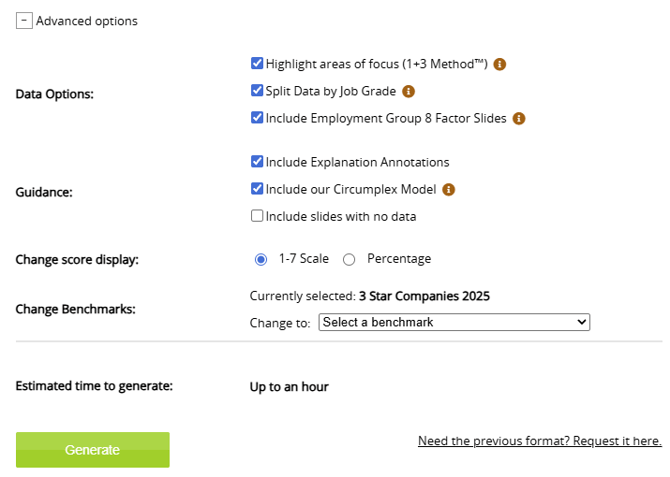
A series of advanced options are available to allow you to tailor your reports. These will be defaulted according to your earlier selections.
-
Highlight areas of focus: Based on our Best Companies 1 + 3 Method™ and your data, this will identify 1 area to celebrate and 3 opportunities to improve.
- Split data by job grade (Only available in Leader Pack): Includes job grade data within reports and the logic driving the areas of focus highlighted in the Best Companies 1 + 3 Method™ (as above).
- Include employment group 8 Factor slides: Includes 8 factor slides for each selected employment group.
- Include explanation annotations: Ideal for organisations less familiar with our charts and methodologies.
- Include our Circumplex Model: Adds slides about our Circumplex Model, a framework that maps employee engagement across 9 zones based on mental activation and emotional experience, helping leaders understand where employees sit and what action to take. Learn more here.
- Include slides with no data: This means slides where job grades or employment groups haven't had enough responses to return a result will still feature within the reports.
- Change score display: Choose between a 1-7 scale or percentage according to your preference.
Generate
When you’re happy with your options, click the ‘Generate’ button to start generating your data packs.
A confirmation box will appear, click ‘Ok’ to return to the ‘Data Packs’ page.
You’ll receive an email containing a link to download your data pack. This link will expire after seven days, and after this time you must request a new pack.
Please note: If you’ve surveyed with us before, you’ll be able to generate data packs for previous survey years where you had a Pro WIT package by selecting ‘Preferences’ within the top right corner drop down menu.
For additional support please email support@b.co.uk, call us on 01978 856222, or click the 'Get in Touch' button at the top of this page.